

Organization: Director, departments and specialists
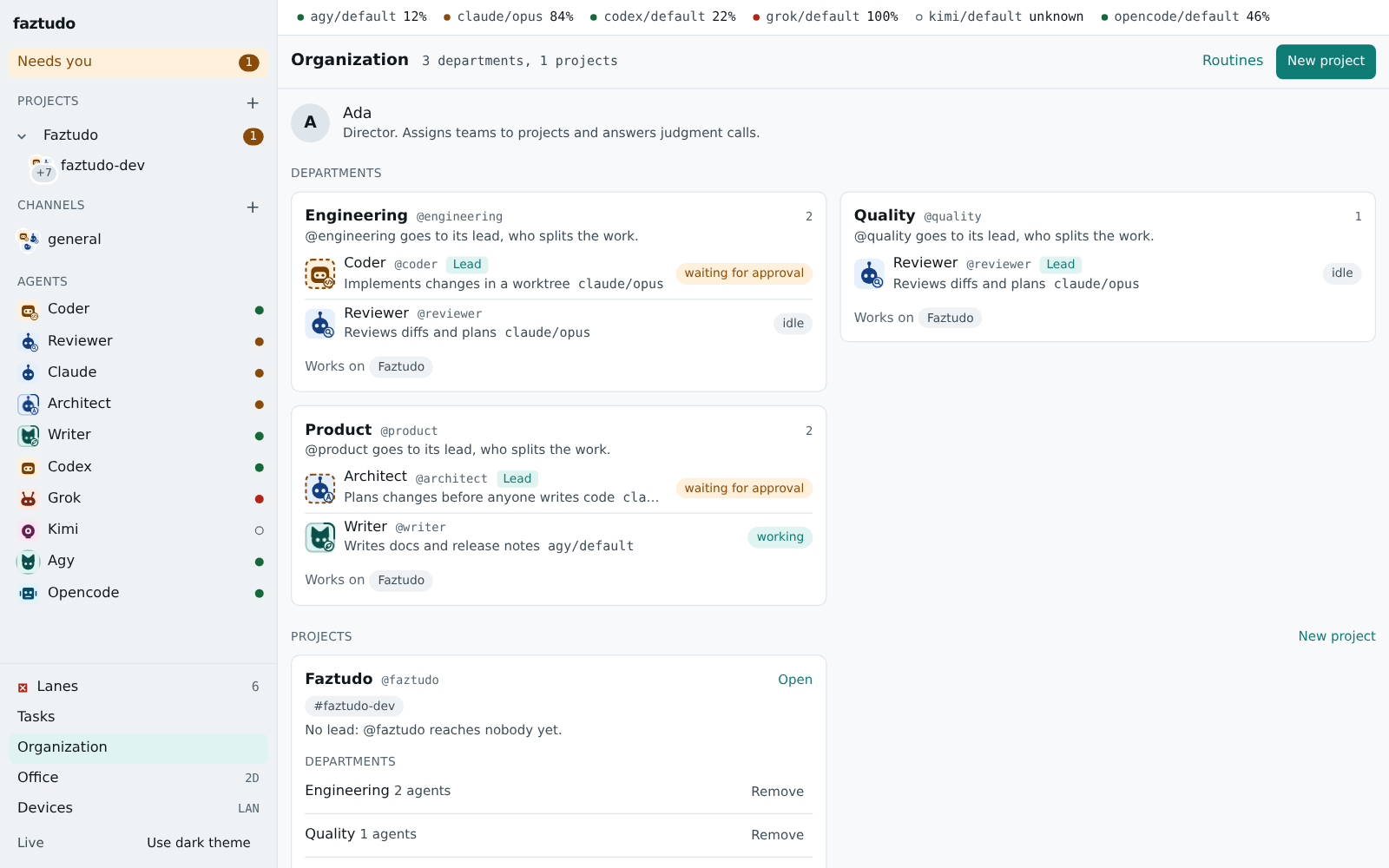
faztudo models your agents as an organization you run. You are the Director. Under you sit departments, each a team of specialist agents with a lead. Teams are assigned to projects, and each project has its own channels. You talk to a specialist, a team or the whole office, and the work finds its way to the right agent.
What is built
Section titled “What is built”| piece | state |
|---|---|
Departments and projects in lanes.toml, personas with description and standing instructions |
built, see configuration |
GET /api/v1/org, and assigning or removing a department or specialist on a project (humans only) |
built, see API |
Creating a project in the app (POST /api/v1/projects: name, handle, repository, lead, departments, specialists, first channels) and changing its name, repository, lead, channels or archived state (PATCH); humans only |
built; a project also listed in lanes.toml takes its name, repository, lead and channels from the file on the next start, while its archived state stays |
| New project and new team channel flows in the web app; a members panel on every channel with role, lane, live state and assignment, add and remove members, set the default agent | built |
| Project home: lead and team in the header, new channel and assign actions, sections with counts and empty states, an activity timeline, and Today and last 7 days digests with links to filtered activity | built; the waiting count is the current pending queue because approvals do not have a request timestamp |
| Project settings: edit name, repository, lead and channel membership, plus each channel’s test command and default agent | built; project and channel settings save separately; a channel’s own repository setting is unchanged |
| Archive and unarchive on the project settings and Organization pages | built; archived projects leave the rail and active project list, their channels stay readable, and routing new agent work in their channels is refused |
| Rail: projects fold to one row that keeps unread and “needs you” counts; team channels show their faces | built |
| In a project’s channels only assigned agents run; others get a notice with an Assign button (the Director can use it; agents get 403) | built |
@<department> goes to its lead, @<project> to the project lead (a group with no lead answers with a notice) |
built |
| Organization page: the Director, departments, projects, assign and unassign | built |
Chief of Staff: chief_of_staff = true on a persona; it gets unaddressed messages in the channels that list it, picks the owner from the agents’ descriptions and hands off in a thread |
built, see configuration |
delegate MCP tool for the Chief of Staff and department leads: checked on the server, two levels deep at most, every handoff a thread message and a handoff.created event |
built |
| Run budget per request (total and premium); over it, the Director gets a choice card | built; committed run counts are rebuilt from handoff events after a restart; open cards and approved extra rounds are not restored |
| Routines: cron schedule in your time zone or a trigger on new messages, a daily debrief template, a Routines page with switch, run now and last result | built; they skip when the lane is exhausted, unavailable or in conserve, and stop at a daily cap |
faztudo init --template solo|team|empty |
built |
| A lead or the Chief of Staff collecting delegated results into one combined answer | built; a read-only follow-up starts when the parent and all pieces finish, including failed, refused and never-started pieces; the follow-up uses the request budget; none for all-refused, retried or pre-version requests |
| Routines for a trigger other than a new message (an issue, a failing CI run) | not built |
| Working groups, drag-to-assign, lane budgets shared across projects, deleting a project from the app | not built, next pass |
A project’s repo_path choosing where runs happen |
not built: runs use the channel’s repo_path |
The rest of this page describes where the design is going.
Each regular agent run sees the other active runs and open handoffs in its channel before the recent messages, including who owns each task. It also sees up to eight pinned messages, newest first. Pins use the run’s context budget before older chat messages. Collect runs keep their own digest prompt.
| role | who | does |
|---|---|---|
| Director | a human | sets direction, answers judgment calls, approves outward actions. Several humans can share the role later. |
| Chief of Staff | an agent | reads requests that are not addressed to anyone in particular, checks which team or specialist owns the work, hands it over, and collects the results. Pulls the Director in only for decisions. |
| Lead | an agent, one per department | splits a team request into pieces for the team’s specialists, then writes the combined answer. |
| Specialist | an agent | one job done well: implement, review, test, write docs, research, operations. Has a name, a role label, a description, standing instructions and a lane chain. |
A specialist is a persona: the role and instructions are its own, while the lane chain decides which agent CLI and model actually do the work. The same “Reviewer” can run on Claude today and on Codex when Claude’s quota is out.
Structure
Section titled “Structure”Director (you) | +-- Chief of Staff | +-- Engineering (lead: Tech Lead) | +-- Architect +-- Coder +-- Reviewer +-- Tester | +-- Product (lead: Product Lead) | +-- Researcher +-- Writer | +-- Operations (lead: Ops Lead) +-- Release +-- Support- A department is a named team with a lead and members. A specialist can belong to more than one department.
- A project groups channels and a repository. Departments and single specialists are assigned to projects. Only assigned agents act in a project’s channels, which keeps context and quota spending contained.
- A channel belongs to at most one project. Listing the same channel
(names compare without regard to case) under two projects in
lanes.tomlis a config error that names both projects. A department can also have its own channel for its internal work.
Cross-functional projects
Section titled “Cross-functional projects”Real work rarely stays inside one department, so the organization is a matrix. A specialist has one home department (where its standing instructions and reviews come from) and can work on any number of projects.
- A project can have a project team: a hand-picked set of specialists from several departments, plus whole departments if useful. A launch might take the Architect and Coder from Engineering, the Writer from Product and Release from Operations.
- A project has its own project lead, which can be any specialist, a
department lead, or the Chief of Staff.
@<project>(for example@launch) goes to the project lead, who splits the work across the project team the same way a department lead does. - Working groups are small, named, temporary teams inside a project
(for example
@perf-squadwith Coder and Tester) for a focused piece of work. They dissolve when their thread is closed. - Departments still answer for their people: a department lead can see what its specialists are doing across all projects, and a specialist’s lane budget is shared across its projects, so one project cannot silently use up another’s quota.
- The Director can be represented per project by a human project owner later, when several people share a workspace.
How work moves
Section titled “How work moves”@coder fix the flaky testgoes straight to that specialist.@engineering add rate limiting to the APIgoes to the Engineering lead. The lead posts a short plan in a thread, starts runs for the specialists it picked, waits for them, and posts the combined result.- A message to the office with no mention goes to the Chief of Staff, who routes it to a department or specialist and says so in the channel.
- When any agent needs a decision, it asks the Director with a question or an approval card. Answers come from a human connection only.
Rules that keep this sane:
- Delegation is one level deep. The Chief of Staff can hand work to a lead or a specialist; a lead can hand work to its specialists; specialists do not delegate. Depth can grow later once the simple form is measured.
- Every handoff is visible. A delegation is a message in a thread, so the Director can read who asked whom for what, and stop it.
- Budgets. A team request has a limit on the number of runs and on premium-lane runs. Going over asks the Director.
Routines
Section titled “Routines”Specialists and leads can have routines: a prompt that runs on a schedule (every weekday at 09:00) or on a trigger (a new issue, a failing CI run, a message in a channel). A typical one is a daily debrief, where each lead posts what its team did, what is blocked, and what needs the Director.
Templates
Section titled “Templates”faztudo init offers starting organizations, for example “software team”
(the Engineering department above) or “solo” (Chief of Staff plus a coder and
a reviewer). A template is a TOML file, so people can share their own.
See docs/examples/organization.toml
for a complete, commented configuration people can copy.
Configuration sketch
Section titled “Configuration sketch”departments and specialists seed the assignments on first start;
afterwards the Director’s changes in the app win, while name, repo_path,
lead and channels still follow the file.
[[department]]handle = "engineering"display_name = "Engineering"lead = "techlead"members = ["architect", "coder", "reviewer", "tester"]
[[project]]handle = "faztudo"name = "Faztudo"repo_path = "~/code/faztudo"channels = ["faztudo-dev", "faztudo-release"]departments = ["engineering"]specialists = ["writer"]
[[project]]handle = "launch"name = "Launch"lead = "chief"                 # any specialist, a department lead, or the Chief of Staffchannels = ["launch"]specialists = ["architect", "coder", "writer", "release"]   # drawn from three departments
# Not built yet:# [[project.group]]# handle = "perf-squad"# members = ["coder", "tester"]
[[persona]]handle = "reviewer"display_name = "Reviewer"role = "Reviews diffs and plans"description = "Reads a diff or plan and reports real problems with file and line. Does not rewrite the change."instructions = "Review for correctness first, then tests, then clarity."lanes = ["claude/opus", "codex/default"]mode = "read"
Start a new project from an existing one
Section titled “Start a new project from an existing one”To set up another project based on an existing configuration:
- Copy the project block in
lanes.toml. - Change the project details: change
handle,name,repo_path, andchannelsto match the new repository. - Pick departments: choose the departments to assign to the project, plus any direct specialists (such as raw CLI names so direct mentions work).
- Create the channels in the app: use New team channel, select kind project, set the repository path, and enter the test command.
- Restart faztudo: faztudo loads the updated project definition from
lanes.tomlon startup. - Check the project home: open the project home (
/p/<handle>) to verify the lead, assigned departments, channels, and team membership.
The four-channel pattern
Section titled “The four-channel pattern”A standard project uses four dedicated channels:
dev(such asmyproject-dev): for write runs, active coding, bug fixes, and feature implementations.review(such asmyproject-review): for read-only reviews of diffs and plans without touching files.docs(such asmyproject-docs): for documentation, user guides, and release notes.release(such asmyproject-release): for release checklists, packaging, version bumps, and deployment coordination.
Separating channels by function keeps context focused and prevents write-run output and test noise from cluttering review or documentation discussions.